Annotation: a social technology for reading
Bring discussion back onto the article, not under it.
Annotation is what happens when reading becomes active: you mark a passage, attach meaning, ask a question, disagree, connect sources, or leave a trace for the next reader. It’s not “comments under an article” — it’s conversation anchored to the exact sentence that sparked it.
At its best, annotation turns publishing from broadcast into participation: readers don’t just react, they read together – with each other.

A very brief history of annotation
Long before the web, people read in layers.
Ancient scholarship
“scholia” were notes written around a core text — commentary inserted into the free space around it.
Modern print:
footnotes, end-notes, and marginalia formalised the same impulse: don’t just read the text — read the context, the argument, and the responses.
Medieval reading culture
glosses and commentaries became a primary way knowledge was taught, copied, argued with, and transmitted.
Digital era
the web made reading shareable, but most discussion drifted away from the text (social feeds, group chats, comment sections). Standards like the W3C Web Annotation model emerged to make annotations portable and structured across the web
Page as debate
traditions like the Talmud page literally embody this idea — a central text surrounded by accumulated interpretation, disagreement, and cross-reference.
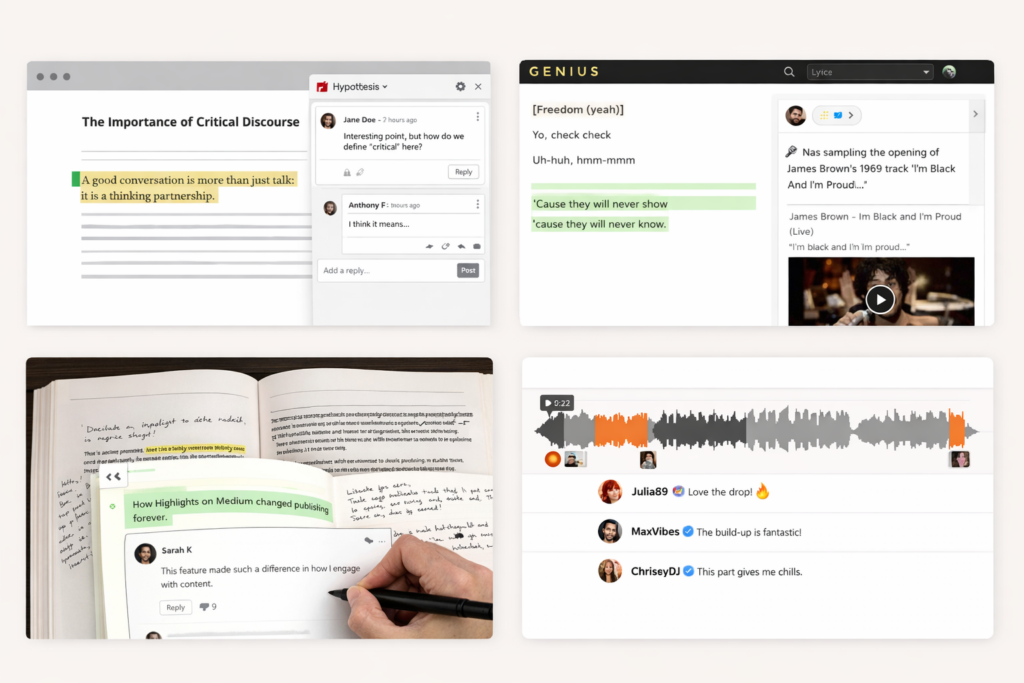
How annotation is used today
Annotation is already a proven pattern — it just tends to live in silos.
In education and research
Social annotation tools help students and groups read closely together on the page (highlighting, replying, threading, sharing notes). Hypothesis is a well-known example in this space.
In product and web teams
Annotation is widely used for feedback: point at the exact UI element, leave a note, resolve, track.
In culture and media
Public annotation can turn texts into living documents — think lyric annotation and explanation-as-community (Genius is a classic reference point in Akin’s thinking).
In publishing UX
Highlights and in-line reactions made “this specific line matters” a visible social signal (Medium’s introduction of Highlights is a milestone here).
Across these contexts, the common thread is simple: anchoring discussion to the text reduces noise and increases meaning.
Why annotation works (and comment sections don’t)
When discussion sits under an article, it becomes general, performative, and hard to moderate. When discussion is in the article:
Reading time and return visits tend to rise because the page becomes a place to do something, not just consume
- Readers respond to specific claims, not vibes
- Conversation stays contextual, so it’s easier to follow
- Contributions become useful (explain, source, question, correct)
- Moderation becomes more actionable (you can see what a comment is attached to)
Where Akin comes in
Akin is built around a simple idea: bring annotation to publisher websites in a way that’s publisher-first — not a centralised platform.
Visually and conceptually, it’s inspired by the “core text + surrounding commentary” tradition (including Talmudic layouts), alongside modern patterns like sidebars, highlights, and cultural annotation formats.
With Akin, publishers can:
- Learn what readers actually linger on, question, and share
- Enable highlights + in-context discussion directly on articles
- Keep moderation, data ownership, and analytics in-house
- Build healthier conversation without sending readers to social platforms
Where Akin comes in
- What it is: A WordPress plugin that adds highlights + in-article discussion + an editor/moderation dashboard
- Who it’s for: newsroom/editorial teams, membership publishers, longform, etc.
- What you control: moderation workflow, permissions, analytics, data ownership
- How: Highlight → Reply → Editor moderates.
Want to pilot Akin on your site?
Run a limited rollout (subscribers, members, or specific sections), measure what changes, and iterate with real editorial feedback.